MCP Server
Overview
The Arrival Space MCP (Model Context Protocol) server allows AI assistants like Claude to interact directly with your Arrival Space account. You can create spaces, manage entities, and control your 3D environments through natural language conversations.
The Model Context Protocol is an open standard that enables AI assistants to securely connect to external services. When you connect Claude to Arrival Space via MCP, Claude can perform actions on your behalf — like creating new spaces or adding 3D content.
Connecting to Claude
Setup
- In Claude, go to Settings → Connectors → Add custom connector
- Enter the URL:
https://api-live.arrival.space/api/v1/mcp
- Sign in with your Arrival Space account
- Done!
Connecting to OpenAI Codex
Setup
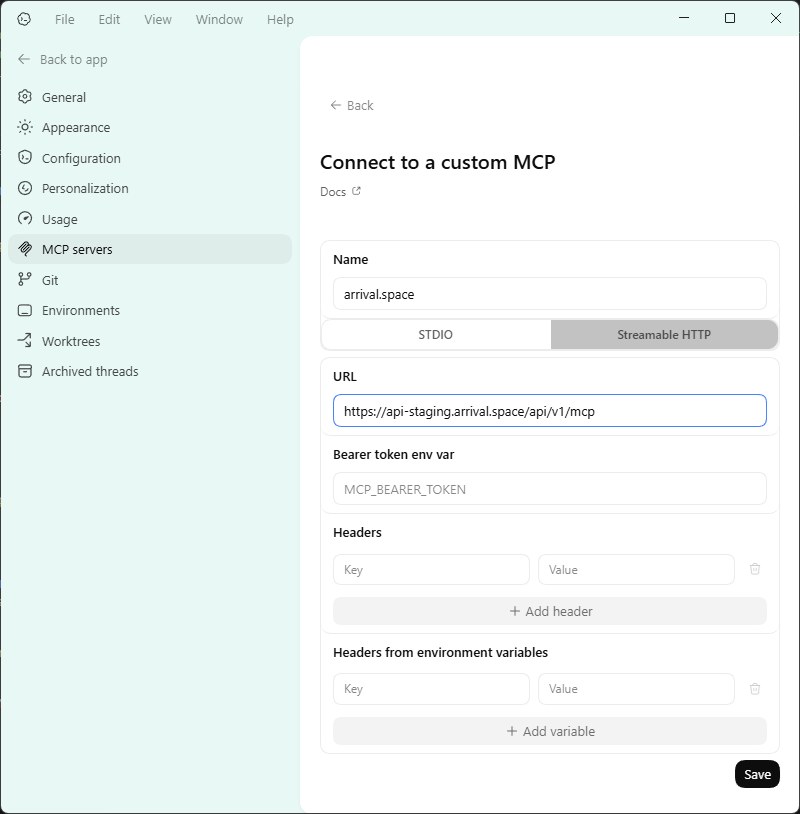
- In Codex, go to Settings → MCP servers → Add server
- Configure the connection:
- Name:
arrival.space - Transport:
Streamable HTTP - URL:
https://api-live.arrival.space/api/v1/mcp
- Name:
- Click Save, then click Authenticate
- A browser window will open — sign in with your Arrival Space account
- Done!
Available Tools
Once connected, the AI assistant can use the following tools to interact with your Arrival Space account:
Space Management
| Tool | Description |
|---|---|
list_spaces | List all spaces owned by you. Supports search and pagination |
get_space | Get details of a specific space |
create_space | Create a new space (hub or infinite) |
update_space | Update space title, description, or privacy |
delete_space | Delete a space and all its entities |
update_space_privacy | Change space privacy setting (Open/Closed) |
get_space_screenshot | Get a screenshot image of a space (JPEG) |
Entity Management
| Tool | Description |
|---|---|
list_entities | List all entities in a space. Supports pagination |
get_entity | Get a single entity's details |
create_entity | Create a new entity (3D model, plugin, splat, image, etc.) |
update_entity | Update entity properties (merge semantics) |
delete_entity | Delete an entity from a space |
Entity Data Fields
The entity_data object supports the following common fields:
| Field | Type | Description |
|---|---|---|
position | {x, y, z} | World position. Example: {x: 0, y: 1.5, z: -3} |
rotation | {x, y, z} | Euler rotation in degrees. Example: {x: 0, y: 90, z: 0} |
scale | number | Uniform scale multiplier. Default: 1.0. Example: 2.0 = double size |
params | object | Plugin property values — keys match the plugin's static property names |
glbUrl | string | CDN URL for the entity's asset — 3D model, image, splat, or plugin script (.mjs). Name is historical; auto-set when using resource_key |
When updating an entity, only include the fields you want to change. Omitted fields keep their current values (merge semantics).
Avatar Management
| Tool | Description |
|---|---|
list_avatars | List your avatars with IDs, parts, tints, and thumbnail URLs |
get_avatar_catalog | Get available avatar parts and categories with appearance descriptions |
create_avatar | Create an avatar from parts. Returns a jobSeq — poll get_avatar_status for the result |
generate_avatar_from_description | Create an avatar from a natural language description (e.g. "short red hair, blue jacket") |
update_avatar | Update an existing avatar's parts or tints |
assign_avatar | Set an avatar as your active avatar |
get_avatar_status | Check avatar generation status and get the GLB model URL when ready |
delete_avatar | Delete an avatar |
File Uploads
| Tool | Description |
|---|---|
upload_text_file | Upload a UTF-8 text file (plugins, JSON, etc.) to the CDN. Returns a resource_key |
upload_file_from_url | Upload a file from an external URL to the CDN. Returns a resource_key |
upload_binary_file | Upload a base64-encoded binary file (GLB, images, etc.) to the CDN. Returns a resource_key |
Use resource_key from file uploads with create_entity to place uploaded content in a space.
Plugins
| Tool | Description |
|---|---|
get_plugin_docs | Fetch plugin documentation and examples from the Arrival plugins repository |
User Information
| Tool | Description |
|---|---|
get_user_info | Get your profile information |
Example Conversations
Here are some things you can ask Claude once connected:
List your spaces:
"Show me all my Arrival Space spaces"
Create a new space:
"Create a new space called 'My Gallery' with the description 'A showcase of my 3D art'"
Manage entities:
"List all entities in my space 45637586_1234"
Update privacy:
"Make my space 45637586_1234 private"
Technical Details
Server Endpoint
https://api-live.arrival.space/api/v1/mcp
Authentication
The MCP server uses OAuth 2.0 with PKCE for secure authentication. When you authorize the connection, your existing API key is used as the access token — the same key visible in your Arrival Space account settings.
Supported Transports
- Streamable HTTP (recommended for Claude Desktop)
- SSE (Server-Sent Events) for legacy clients
OAuth Discovery
MCP clients can auto-discover OAuth endpoints via:
GET /.well-known/oauth-authorization-server
Troubleshooting
Connection Issues
If Claude cannot connect to Arrival Space:
- Check the server URL — ensure it's exactly
https://api-live.arrival.space/api/v1/mcp - Restart Claude Desktop after editing the config
- Re-authenticate — try removing and re-adding the connection
Authentication Popup Doesn't Appear
- Make sure popups are not blocked in your browser
- Try opening the OAuth URL manually if Claude provides one
"Invalid API key" Errors
- Your session may have expired — re-authenticate by triggering any Arrival Space action
- Check that your Arrival Space account is verified and active
Security
- Your password is never shared with Claude
- Authentication uses industry-standard OAuth 2.0 with PKCE
- The access token is your API key, which you can revoke anytime from your Arrival Space account settings
- All communication is encrypted via HTTPS
Only connect to MCP servers you trust. The Arrival Space MCP server at api-live.arrival.space is officially maintained by the Arrival Space team.